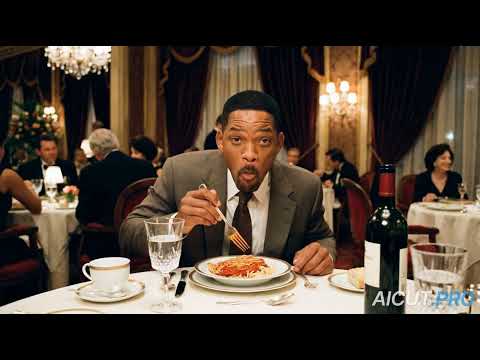
The Will Smith spaghetti clips make a memorable comparison. In March 2023, a Reddit post showed a strange synthetic version of the actor attempting to eat. In March 2026, the creator aicut published a new version on YouTube, identifying Kling 3.0 as the tool used. Both are generated depictions, not footage of Will Smith performing those scenes.
For a filmmaker, the important change is practical. Your audience increasingly needs information beyond what a shot looks like. If you want people to recognise the human work behind your release, give them a record they can inspect.
 Watch the source
 ModelScope · chaindrop
The spaghetti clip that became a reference point for early AI video.
 Watch the source
 Kling 3.0 · aicut
A creator revisits the same idea with a newer video model.
A useful comparison, not a universal test
The spaghetti posts show how creators have revisited one recognisable idea as video tools improve. They are selected examples made by different people, with different tools and settings. They do not establish that every generated video is indistinguishable from filmed footage, or predict the date when that might happen.
You do not need that prediction to see the problem. An impressive image still cannot tell a client whether a performer was filmed, a character was generated or an editor made the decisions visible in the final cut. Visual quality and production history answer different questions.
Generation is becoming part of the workflow
Higgsfield’s current catalog lists video models including Seedance 2.5 and Kling 3.0. Its product documentation describes configurable shots, sound and duration. Creators can choose a model and build generated shots into a wider production.
In a September 2026 customer story, Higgsfield describes how Double Shots planned generated sequences for music videos by Ivy and combined selected results with filmed footage. It is a vendor account of one production, but it illustrates a real distinction: a release can contain several methods of making images, even when the finished edit looks coherent.
Give the people behind the cut a visible place
If you direct, edit, grade or produce, your contribution includes choices that disappear into the result. A credit names your role. A process record adds the project, recorded activity, collaborators and version that give that role context.
Start before delivery. Agree who contributes, which creative tools they use and which rules apply. Keep the recorded work connected to the right project as versions change. When a client asks how you made the piece, you can answer from the work itself instead of reconstructing a timeline from memory.
- For independent filmmakers, connect your contribution to the version you share.
- For studios, keep contributor activity and review decisions together across handoffs.
- For reviewers, inspect the declared process, available evidence and any recording gaps.
The rules need to apply during the work
DigiBridge brings registered projects, permitted activity records and layered detection into the same process. Its verification agent examines authorised evidence alongside device, system and creative tool checks for prohibited assistance or software acting in place of a contributor. The agent reviews the work record; it does not make the film for you.
A warning gives you the finding and a way to add context. A first confirmed incident holds the affected recording or version. Three distinct confirmed incidents make the project ineligible for directory publication. An uncertain result or a gap alone is not an incident. This gives the standard consequences while keeping a route to review and correction.
“The better generated video becomes, the more your production history matters.
How DigiBridge helps
Give your next film a record you can stand behind.
DigiBridge connects the human contribution to the project and version under review. You authorise the activity used for verification. Source footage, creative files and what you type stay outside evidence collection, so documenting the process does not mean handing over the production.
In the strict human creation programme, permitted device, operating system and creative tool evidence feeds layered checks and an AI verification agent. These detect prohibited AI assistance and software control, warn creators with supporting evidence, and inform publishing decisions after confirmation and review. A warning or uncertain result alone does not count as an incident.
Read the human creation standardSources and further reading
Primary and authoritative sources reviewed for this article. Statistics remain attributed to the organization that published them.
- 01Will Smith eating spaghettiOriginal Reddit postMarch 2023 example. Linked as a historical synthetic clip, not an authorised performance or controlled benchmark.
- 02Will Smith eating spaghetti in 2026aicut on YouTube9 March 2026. The creator identifies Kling 3.0; that attribution is the creator’s account. Linked as a synthetic depiction, not a real performance or endorsement.
- 03Higgsfield API model catalogHiggsfieldProduct catalog checked on 30 September 2026. Model listings can change.
- 04Double Shots produces music videos for IvyHiggsfield19 September 2026. Vendor case study describing planned generated shots alongside filmed footage.
Continue reading
Browse all insights